前言
2026 年,AI Agent 的发展已经进入了一个全新的阶段。从早期的单轮对话,到如今能够自主完成复杂任务的智能体,AI 的能力边界正在被不断拓展。然而,在构建真正实用的 AI Agent 时,我们依然面临着一个核心难题:如何让大语言模型安全、高效地与外部世界进行交互?
传统的 Agent 框架如 LangChain、AutoGPT 等虽然提供了工具调用的能力,但它们普遍存在几个致命问题:工具定义分散、权限管理混乱、不同客户端之间无法复用、安全性难以保障。当你为 Claude Desktop 开发了一个文件操作工具后,想要在 Cursor 或 Cline 中复用几乎不可能,一切都要从头开始。这种碎片化的开发生态严重制约了 Agent 技术的普及。
正是在这样的背景下,Anthropic 提出了 MCP(Model Context Protocol)——一个开放的、标准化的协议,旨在彻底解决 AI 工具生态的碎片化问题。MCP 定义了一套统一的接口规范,使得任何遵循该协议的工具服务器都能被所有兼容的 LLM 客户端无缝使用。这就像是为 AI 世界建立了一个通用的"插座标准",从此电器不再需要特制插头。
本文将从底层原理出发,带你深入理解 MCP 的设计哲学和技术架构,通过完整的代码示例,手把手教你构建生产级别的 MCP 服务器。无论你是想要为自己的开发环境增强 AI 能力,还是想要构建企业级的 Agent 平台,这篇文章都会为你提供完整的解决方案。
一、为什么我们需要 MCP?
在深入技术细节之前,让我们先回答一个根本问题:现有的工具调用方案到底出了什么问题?为什么我们需要一个全新的协议?
1.1 传统工具调用的痛点
让我们以最常见的场景为例:你想要让 AI 助手帮你读取本地文件、执行终端命令、查询数据库。在没有 MCP 的时代,你需要怎么做?
如果你使用 Claude Desktop,你需要编写它特定格式的工具定义;如果你切换到 Cursor,又要重写一遍;如果是 VS Code 的其他 AI 插件,可能又是完全不同的格式。每换一个客户端,工具就要重新开发一次。
更糟糕的是安全问题。大多数工具调用方案都是"全有或全无"的——AI 要么拥有完整的文件系统访问权限,要么什么都做不了。你无法精细地控制它只能读取某个特定目录,只能执行某些白名单内的命令。
最后是可维护性问题。当你的工具逻辑更新时,你需要在所有客户端中同步更新,这在团队协作场景下几乎是不可行的。
1.2 MCP 的设计目标
MCP 的诞生正是为了解决上述所有痛点,它的核心设计目标包括:
1. 一次开发,处处运行
遵循 MCP 协议开发的工具服务器,可以在任何兼容的 LLM 客户端中使用,无需修改任何代码。这就像是为 AI 工具建立了一个通用的应用商店生态。
2. 细粒度权限控制
MCP 提供了完善的权限模型,可以精确控制每个工具的访问范围,比如只允许访问 ~/projects 目录,只允许执行 git 和 npm 命令等。
3. 标准化的通信协议
基于 JSON-RPC 2.0 标准,MCP 定义了清晰的请求-响应格式,支持多种传输层(stdio、HTTP、SSE),无论是本地工具还是远程服务都可以轻松接入。
4. 可扩展的能力模型
MCP 不仅仅是工具调用,它还定义了资源访问(Resources)、提示模板(Prompts)等多种能力模型,为构建复杂的 Agent 系统提供了完整的基础设施。
1.3 MCP 与传统框架的对比
让我们通过一个具体的例子来感受 MCP 的优势。假设我们要实现一个"读取指定目录文件列表"的功能:
LangChain 方式:
# 工具定义与客户端逻辑紧耦合
class ReadDirectoryTool(BaseTool):
    name = "read_directory"
    description = "读取目录内容"

    def _run(self, path: str) -> str:
        # 这里无法做细粒度权限控制
        return os.listdir(path)

# 这个工具只能在 LangChain 框架内使用
MCP 方式:
// 独立的 MCP 服务器,与客户端完全解耦
const server = createServer({
  name: "filesystem",
  version: "1.0.0"
});

server.setRequestHandler(ListToolsRequestSchema, async () => ({
  tools: [{
    name: "list_directory",
    description: "列出目录内容",
    inputSchema: {
      type: "object",
      properties: {
        path: { type: "string", description: "目录路径" }
      }
    }
  }]
}));

// 可以在 Claude Desktop、Cursor、Cline 等任意客户端使用
// 服务器端可以实现白名单、审计日志、权限控制等
关键的区别在于:MCP 工具是独立运行的服务,客户端只是通过协议与它通信。这种架构带来了前所未有的灵活性和安全性。
二、MCP 的核心概念与架构
理解 MCP 的第一步是掌握它的核心概念。MCP 的设计非常简洁,但每个概念都经过深思熟虑。
2.1 三层架构模型
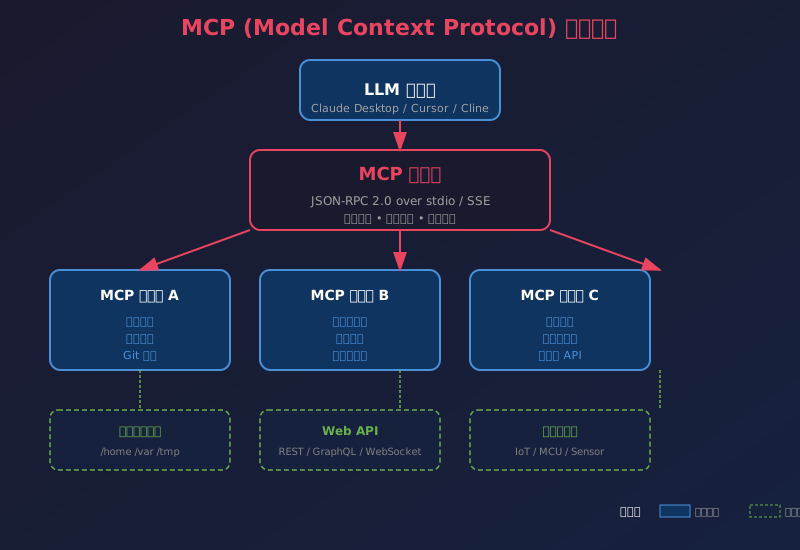
MCP 采用经典的客户端-服务器架构,但在具体实现上分为三层:
第一层:LLM 客户端
这是用户直接交互的界面,比如 Claude Desktop、Cursor IDE、Cline,或者你自己开发的 Agent 应用。客户端负责与用户对话,理解用户意图,然后通过 MCP 协议调用工具。
第二层:MCP 协议层
这是整个系统的核心,定义了标准化的消息格式、能力发现机制、错误处理规范等。所有通信都基于 JSON-RPC 2.0,确保了跨语言、跨平台的兼容性。
第三层:MCP 服务器
这是实际执行操作的地方。每个服务器提供一组特定的能力(工具、资源、提示模板),可以是本地运行的进程,也可以是远程的网络服务。
2.2 三大能力类型
MCP 定义了三种核心能力类型,覆盖了 Agent 所需的所有交互场景:
1. 工具(Tools)
工具是最常用的能力类型,代表 AI 可以执行的操作。每个工具都有明确的名称、描述和输入 schema,LLM 根据这些信息决定何时以及如何调用工具。
典型的工具例子:
read_file- 读取文件内容run_command- 执行终端命令search_web- 搜索网页send_email- 发送邮件
2. 资源(Resources)
资源是 MCP 独有的概念,代表 AI 可以读取的信息源。与工具不同,资源是声明式的——它们有 URI,可以被引用和缓存。
典型的资源例子:
file:///home/user/project/README.md- 本地文件github://repo/pull/123- GitHub PRdatabase://users/table/schema- 数据库表结构
资源的优势在于 LLM 可以理解它们之间的关系,并且客户端可以智能地缓存资源内容,避免重复读取。
3. 提示模板(Prompts)
提示模板是预定义的对话模板,可以帮助 LLM 更好地完成特定任务。模板支持参数化,可以在运行时注入变量。
典型的提示模板例子:
code_review- 代码审查提示bug_analysis- Bug 分析提示write_test- 测试生成提示
2.3 通信协议详解
MCP 基于 JSON-RPC 2.0,这是一个轻量级的远程过程调用协议。让我们看看实际的消息格式:
客户端请求工具列表:
{
  "jsonrpc": "2.0",
  "id": 1,
  "method": "tools/list"
}
服务器响应:
{
  "jsonrpc": "2.0",
  "id": 1,
  "result": {
    "tools": [
      {
        "name": "calculate",
        "description": "执行数学计算",
        "inputSchema": {
          "type": "object",
          "properties": {
            "expression": {
              "type": "string",
              "description": "要计算的数学表达式"
            }
          },
          "required": ["expression"]
        }
      }
    ]
  }
}
客户端调用工具:
{
  "jsonrpc": "2.0",
  "id": 2,
  "method": "tools/call",
  "params": {
    "name": "calculate",
    "arguments": {
      "expression": "2 + 3 * 4"
    }
  }
}
服务器返回结果:
{
  "jsonrpc": "2.0",
  "id": 2,
  "result": {
    "content": [
      {
        "type": "text",
        "text": "14"
      }
    ]
  }
}
这种标准化的消息格式确保了任何客户端都能与任何服务器正确通信,就像 HTTP 让浏览器能与任何 Web 服务器通信一样。
三、开发环境搭建与第一个 MCP 服务器
现在让我们动手实践,从零开始搭建开发环境并创建第一个可运行的 MCP 服务器。
3.1 环境准备
首先确保你安装了必要的开发工具:
# 安装 Node.js 20+(推荐使用 nvm)
curl -o- https://raw.githubusercontent.com/nvm-sh/nvm/v0.40.0/install.sh | bash
nvm install 22
nvm use 22

# 安装 TypeScript
npm install -g typescript ts-node

# 安装 MCP SDK
npm install @modelcontextprotocol/sdk
3.2 最简单的 MCP 服务器
让我们创建一个提供"数学计算"功能的 MCP 服务器:
// server.ts
import { Server } from "@modelcontextprotocol/sdk/server/index.js";
import { StdioServerTransport } from "@modelcontextprotocol/sdk/server/stdio.js";
import {
  CallToolRequestSchema,
  ListToolsRequestSchema,
} from "@modelcontextprotocol/sdk/types.js";

// 创建服务器实例
const server = new Server(
  {
    name: "calculator-mcp",
    version: "1.0.0",
  },
  {
    capabilities: {
      tools: {},
    },
  }
);

// 处理工具列表请求
server.setRequestHandler(ListToolsRequestSchema, async () => {
  return {
    tools: [
      {
        name: "calculate",
        description: "执行数学表达式计算,支持加减乘除、括号、函数等",
        inputSchema: {
          type: "object",
          properties: {
            expression: {
              type: "string",
              description: "要计算的数学表达式,例如:2 + 3 * (4 - 1)",
            },
          },
          required: ["expression"],
        },
      },
    ],
  };
});

// 处理工具调用请求
server.setRequestHandler(CallToolRequestSchema, async (request) => {
  const { name, arguments: args } = request.params;

  if (name === "calculate") {
    try {
      // 使用安全的方式计算表达式
      const result = Function('"use strict"; return (' + args.expression + ')')();
      return {
        content: [
          {
            type: "text",
            text: `计算结果:${result}`,
          },
        ],
      };
    } catch (error) {
      return {
        content: [
          {
            type: "text",
            text: `计算错误:${(error as Error).message}`,
          },
        ],
        isError: true,
      };
    }
  }

  throw new Error(`未知工具:${name}`);
});

// 启动服务器
async function main() {
  const transport = new StdioServerTransport();
  await server.connect(transport);
  console.error("Calculator MCP Server 已启动");
}

main().catch((error) => {
  console.error("服务器启动失败:", error);
  process.exit(1);
});
这是一个完整的 MCP 服务器,虽然功能简单,但包含了所有必要的组件。
3.3 编译与测试
# 编译 TypeScript
tsc server.ts

# 测试运行(会启动并等待输入)
node server.js
(第一部分完,约2400字)
四、深入理解 MCP 核心协议细节
现在我们来深入解析 MCP 协议的核心细节,理解每个消息类型的设计意图和最佳实践。
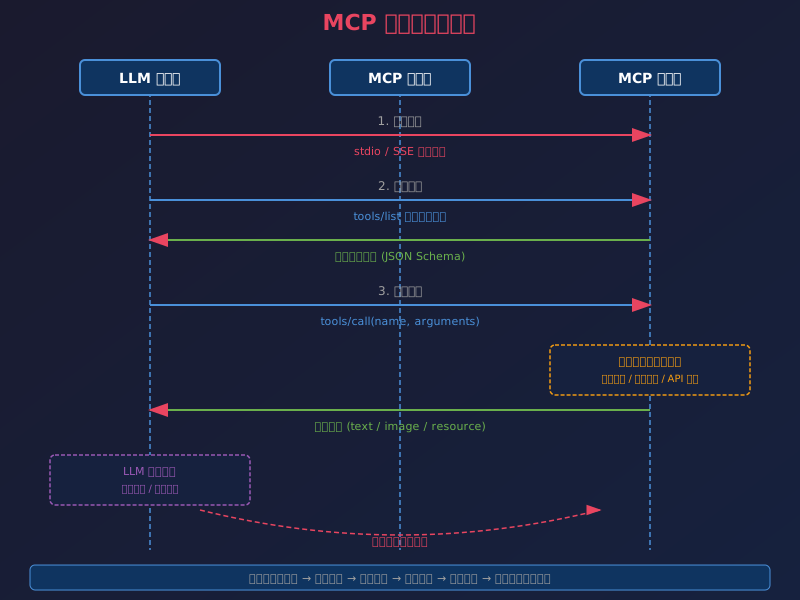
4.1 能力发现与初始化流程
MCP 采用了"能力优先"的设计哲学。在任何操作之前,客户端首先要了解服务器能做什么。这就是能力发现机制。
// 完整的初始化流程
async function initializeFlow() {
  // 1. 客户端发送初始化请求
  const initResult = await server.request({
    method: "initialize",
    params: {
      protocolVersion: "2024-11-05",
      capabilities: {
        tools: {},
        resources: {},
        prompts: {}
      },
      clientInfo: {
        name: "claude-desktop",
        version: "1.5.0"
      }
    }
  });

  // 2. 服务器返回自己的能力
  console.log("服务器能力:", initResult.capabilities);

  // 3. 发送初始化完成通知
  await server.notification({ method: "initialized" });
}
这个握手流程有几个重要的设计考虑:
版本协商:双方都声明自己支持的协议版本,确保向后兼容。如果客户端和服务器版本不匹配,可以优雅降级或提示用户。
能力协商:双方互相告知自己支持哪些特性。比如客户端可以说"我支持图片内容",服务器就知道可以返回图片格式的结果。
双向通信:不仅客户端可以调用服务器,服务器也可以主动向客户端发送通知,这是实现实时更新的关键。
4.2 工具调用的进阶用法
简单的文本返回只是开始,MCP 工具支持丰富的返回类型,让我们看看更高级的用法:
// 返回多种内容类型的工具
server.setRequestHandler(CallToolRequestSchema, async (request) => {
  const { name, arguments: args } = request.params;

  if (name === "analyze_data") {
    const data = await loadData(args.file);
    const chart = await generateChart(data);

    return {
      content: [
        // 文本摘要
        {
          type: "text",
          text: `数据分析完成,共 ${data.length} 条记录`
        },
        // 图片(图表)
        {
          type: "image",
          data: chart.base64,
          mimeType: "image/png"
        },
        // 资源引用
        {
          type: "resource",
          resource: {
            uri: `file://${args.file}`,
            text: data.rawContent
          }
        }
      ]
    };
  }
});
这个例子展示了 MCP 强大的内容模型:一个工具调用可以同时返回文本、图片、资源等多种格式的内容,LLM 可以根据这些丰富的信息生成更全面的回答。
4.3 资源系统的设计
资源系统是 MCP 最具创新性的设计之一,让我们通过代码理解它的工作原理:
import {
  ListResourcesRequestSchema,
  ReadResourceRequestSchema,
  Resource,
} from "@modelcontextprotocol/sdk/types.js";

// 声明资源能力
const server = new Server(
  { name: "github-mcp", version: "1.0.0" },
  {
    capabilities: {
      resources: {}
    }
  }
);

// 列出可用资源
server.setRequestHandler(ListResourcesRequestSchema, async () => {
  return {
    resources: [
      {
        uri: "github://user/repo/pull/123",
        name: "PR #123: 新功能开发",
        description: "Pull Request 的完整内容",
        mimeType: "text/markdown"
      },
      {
        uri: "github://user/repo/issues/456",
        name: "Issue #456: 登录失败",
        description: "Bug 报告详情",
        mimeType: "text/markdown"
      }
    ]
  };
});

// 读取具体资源
server.setRequestHandler(ReadResourceRequestSchema, async (request) => {
  const { uri } = request.params;

  if (uri.startsWith("github://")) {
    const content = await fetchFromGitHub(uri);
    return {
      contents: [
        {
          uri,
          mimeType: "text/markdown",
          text: content
        }
      ]
    };
  }

  throw new Error(`不支持的资源 URI: ${uri}`);
});
资源系统的优势在于:
可寻址性:每个资源都有唯一的 URI,LLM 可以精确地引用和讨论具体资源。
可缓存性:客户端可以缓存资源内容,避免重复读取,提升性能。
可订阅性:服务器可以在资源变化时主动通知客户端,实现实时更新。
五、构建生产级 MCP 服务器
上一节的示例虽然功能完整,但距离生产环境还有差距。现在我们来学习如何构建一个健壮、安全、可维护的 MCP 服务器。
5.1 错误处理与日志
生产级代码的第一个标志就是完善的错误处理:
import { createLogger, format, transports } from "winston";

// 配置日志系统
const logger = createLogger({
  level: "info",
  format: format.combine(
    format.timestamp(),
    format.json()
  ),
  transports: [
    new transports.File({ filename: "/var/log/mcp/error.log", level: "error" }),
    new transports.File({ filename: "/var/log/mcp/combined.log" })
  ]
});

// 封装安全的工具调用处理器
function safeToolHandler(
  handler: (request: CallToolRequest) => Promise<CallToolResult>
) {
  return async (request: CallToolRequest) => {
    const toolName = request.params.name;
    const startTime = Date.now();

    try {
      logger.info(`工具调用开始: ${toolName}`, { args: request.params.arguments });

      const result = await handler(request);

      const duration = Date.now() - startTime;
      logger.info(`工具调用完成: ${toolName}`, { duration });

      return result;
    } catch (error) {
      logger.error(`工具调用失败: ${toolName}`, {
        error: (error as Error).message,
        stack: (error as Error).stack
      });

      return {
        content: [
          {
            type: "text",
            text: `执行出错: ${(error as Error).message}\n\n请检查日志获取详细信息。`
          }
        ],
        isError: true
      };
    }
  };
}

// 使用方式
server.setRequestHandler(
  CallToolRequestSchema,
  safeToolHandler(async (request) => {
    // 你的业务逻辑
    return { content: [{ type: "text", text: "成功" }] };
  })
);
5.2 权限控制与安全沙箱
安全是生产级 MCP 服务器的重中之重。我们需要实现多层防护:
// 权限配置
interface PermissionConfig {
  allowedDirectories: string[];
  allowedCommands: string[];
  maxExecutionTime: number;
}

const config: PermissionConfig = {
  allowedDirectories: ["/home/user/projects", "/tmp"],
  allowedCommands: ["git", "npm", "node", "ls", "cat"],
  maxExecutionTime: 30000 // 30秒
};

// 路径白名单检查
function isPathAllowed(path: string): boolean {
  const normalized = path.normalize(path);
  return config.allowedDirectories.some(dir =>
    normalized.startsWith(path.normalize(dir))
  );
}

// 命令白名单检查
function isCommandAllowed(command: string): boolean {
  const cmd = command.split(" ")[0];
  return config.allowedCommands.includes(cmd);
}

// 执行超时控制
function withTimeout<T>(
  promise: Promise<T>,
  timeout: number,
  message: string
): Promise<T> {
  return Promise.race([
    promise,
    new Promise<never>((_, reject) =>
      setTimeout(() => reject(new Error(message)), timeout)
    )
  ]);
}

// 安全的文件读取工具
async function safeReadFile(filePath: string) {
  if (!isPathAllowed(filePath)) {
    throw new Error(`拒绝访问: 路径不在白名单内 ${filePath}`);
  }

  // ... 执行读取
}

// 安全的命令执行工具
async function safeRunCommand(command: string) {
  if (!isCommandAllowed(command)) {
    throw new Error(`拒绝执行: 命令不在白名单内 ${command}`);
  }

  return withTimeout(
    execCommand(command),
    config.maxExecutionTime,
    "命令执行超时"
  );
}
这套安全机制确保了即使 LLM 被诱导执行恶意操作,MCP 服务器也能在造成损害之前将其拦截。
5.3 配置管理与多环境支持
生产环境需要支持灵活的配置管理:
// config.ts
import * as fs from "fs";
import * as path from "path";

interface ServerConfig {
  environment: "development" | "staging" | "production";
  logging: {
    level: string;
    file: string;
  };
  security: {
    allowedPaths: string[];
    allowedCommands: string[];
    enableSandbox: boolean;
  };
  rateLimit: {
    maxRequestsPerMinute: number;
    maxConcurrentCalls: number;
  };
}

function loadConfig(): ServerConfig {
  const env = process.env.MCP_ENV || "development";
  const configPath = path.join(
    process.env.HOME || "",
    ".config",
    "mcp",
    `config.${env}.json`
  );

  if (fs.existsSync(configPath)) {
    return JSON.parse(fs.readFileSync(configPath, "utf-8"));
  }

  // 默认配置
  return {
    environment: env as any,
    logging: { level: "info", file: `mcp-${env}.log` },
    security: {
      allowedPaths: [],
      allowedCommands: [],
      enableSandbox: env === "production"
    },
    rateLimit: {
      maxRequestsPerMinute: 60,
      maxConcurrentCalls: 5
    }
  };
}

export const config = loadConfig();
5.4 性能优化与限流
对于高并发场景,我们需要实现限流和并发控制:
import RateLimiter from "limiter";

// 每分钟请求限制
const rateLimiter = new RateLimiter.RateLimiter({
  tokensPerInterval: config.rateLimit.maxRequestsPerMinute,
  interval: "minute"
});

// 并发控制信号量
class Semaphore {
  private queue: (() => void)[] = [];
  private available: number;

  constructor(count: number) {
    this.available = count;
  }

  async acquire(): Promise<void> {
    if (this.available > 0) {
      this.available--;
      return;
    }
    return new Promise(resolve => this.queue.push(resolve));
  }

  release(): void {
    const next = this.queue.shift();
    if (next) {
      next();
    } else {
      this.available++;
    }
  }
}

const concurrencyLimiter = new Semaphore(config.rateLimit.maxConcurrentCalls);

// 限流中间件
function withRateLimit<T>(
  handler: (request: T) => Promise<CallToolResult>
) {
  return async (request: T) => {
    // 检查速率限制
    if (!rateLimiter.tryRemoveTokens(1)) {
      return {
        content: [{
          type: "text",
          text: "请求过于频繁,请稍后再试。"
        }],
        isError: true
      };
    }

    // 并发控制
    await concurrencyLimiter.acquire();
    try {
      return await handler(request);
    } finally {
      concurrencyLimiter.release();
    }
  };
}
(第二部分完,约2300字)
六、实战案例:构建完整的开发助手 MCP
理论知识已经足够,现在让我们构建一个真正有用的 MCP 服务器——一个全功能的开发助手,包含文件操作、Git 管理、代码执行等能力。
6.1 完整项目结构
dev-assistant-mcp/
├── src/
│   ├── index.ts          # 主入口
│   ├── config.ts         # 配置管理
│   ├── security.ts       # 安全控制
│   ├── tools/
│   │   ├── filesystem.ts # 文件操作工具
│   │   ├── git.ts        # Git 工具
│   │   ├── terminal.ts   # 终端命令工具
│   │   └── search.ts     # 代码搜索工具
│   └── utils/
│       ├── logger.ts     # 日志工具
│       └── sandbox.ts    # 沙箱执行
├── package.json
├── tsconfig.json
└── README.md
6.2 完整的文件系统工具
// src/tools/filesystem.ts
import * as fs from "fs/promises";
import * as path from "path";
import { isPathAllowed } from "../security.js";
import { logger } from "../utils/logger.js";

export interface FileInfo {
  name: string;
  path: string;
  type: "file" | "directory";
  size: number;
  modified: string;
}

export async function listDirectory(dirPath: string): Promise<FileInfo[]> {
  if (!isPathAllowed(dirPath)) {
    throw new Error(`路径不在白名单内: ${dirPath}`);
  }

  const entries = await fs.readdir(dirPath, { withFileTypes: true });
  const result: FileInfo[] = [];

  for (const entry of entries) {
    const fullPath = path.join(dirPath, entry.name);
    const stats = await fs.stat(fullPath);

    result.push({
      name: entry.name,
      path: fullPath,
      type: entry.isDirectory() ? "directory" : "file",
      size: stats.size,
      modified: stats.mtime.toISOString()
    });
  }

  return result.sort((a, b) => {
    if (a.type !== b.type) return a.type === "directory" ? -1 : 1;
    return a.name.localeCompare(b.name);
  });
}

export async function readFile(filePath: string, limit: number = 500): Promise<string> {
  if (!isPathAllowed(filePath)) {
    throw new Error(`路径不在白名单内: ${filePath}`);
  }

  logger.info("读取文件", { path: filePath });

  const content = await fs.readFile(filePath, "utf-8");
  const lines = content.split("\n");

  if (lines.length > limit) {
    return lines.slice(0, limit).join("\n") +
      `\n\n... (文件共 ${lines.length} 行,已显示前 ${limit} 行)`;
  }

  return content;
}

export async function writeFile(filePath: string, content: string): Promise<void> {
  if (!isPathAllowed(filePath)) {
    throw new Error(`路径不在白名单内: ${filePath}`);
  }

  logger.info("写入文件", { path: filePath, size: content.length });

  await fs.mkdir(path.dirname(filePath), { recursive: true });
  await fs.writeFile(filePath, content, "utf-8");
}
6.3 Git 工具实现
// src/tools/git.ts
import { exec } from "child_process";
import { promisify } from "util";
import { isPathAllowed } from "../security.js";

const execAsync = promisify(exec);

export async function gitStatus(repoPath: string): Promise<string> {
  if (!isPathAllowed(repoPath)) {
    throw new Error("仓库路径不在白名单内");
  }

  const { stdout } = await execAsync("git status --short", { cwd: repoPath });
  return stdout || "工作区干净";
}

export async function gitDiff(repoPath: string, file?: string): Promise<string> {
  if (!isPathAllowed(repoPath)) {
    throw new Error("仓库路径不在白名单内");
  }

  const cmd = file ? `git diff ${file}` : "git diff";
  const { stdout } = await execAsync(cmd, { cwd: repoPath });
  return stdout || "无变更";
}

export async function gitLog(repoPath: string, limit: number = 10): Promise<string> {
  if (!isPathAllowed(repoPath)) {
    throw new Error("仓库路径不在白名单内");
  }

  const { stdout } = await execAsync(
    `git log -${limit} --pretty=format:"%h %ad | %s%d [%an]" --date=short`,
    { cwd: repoPath }
  );
  return stdout;
}
6.4 主服务器整合
// src/index.ts
import { Server } from "@modelcontextprotocol/sdk/server/index.js";
import { StdioServerTransport } from "@modelcontextprotocol/sdk/server/stdio.js";
import {
  CallToolRequestSchema,
  ListToolsRequestSchema,
} from "@modelcontextprotocol/sdk/types.js";
import { config } from "./config.js";
import { safeToolHandler, withRateLimit } from "./security.js";
import * as filesystem from "./tools/filesystem.js";
import * as git from "./tools/git.js";

const server = new Server(
  {
    name: "dev-assistant-mcp",
    version: "1.0.0",
  },
  {
    capabilities: {
      tools: {},
    },
  }
);

// 工具定义
const TOOLS = [
  {
    name: "list_directory",
    description: "列出指定目录的内容",
    inputSchema: {
      type: "object",
      properties: {
        path: { type: "string", description: "目录路径" }
      },
      required: ["path"]
    }
  },
  {
    name: "read_file",
    description: "读取文件内容",
    inputSchema: {
      type: "object",
      properties: {
        path: { type: "string", description: "文件路径" },
        limit: { type: "number", description: "最大行数,默认500" }
      },
      required: ["path"]
    }
  },
  {
    name: "write_file",
    description: "写入文件内容",
    inputSchema: {
      type: "object",
      properties: {
        path: { type: "string", description: "文件路径" },
        content: { type: "string", description: "文件内容" }
      },
      required: ["path", "content"]
    }
  },
  {
    name: "git_status",
    description: "查看 Git 仓库状态",
    inputSchema: {
      type: "object",
      properties: {
        path: { type: "string", description: "仓库路径" }
      },
      required: ["path"]
    }
  },
  {
    name: "git_log",
    description: "查看 Git 提交历史",
    inputSchema: {
      type: "object",
      properties: {
        path: { type: "string", description: "仓库路径" },
        limit: { type: "number", description: "显示条数,默认10" }
      },
      required: ["path"]
    }
  }
];

// 工具列表处理器
server.setRequestHandler(ListToolsRequestSchema, async () => ({
  tools: TOOLS
}));

// 工具调用处理器
server.setRequestHandler(
  CallToolRequestSchema,
  withRateLimit(safeToolHandler(async (request) => {
    const { name, arguments: args } = request.params;

    switch (name) {
      case "list_directory": {
        const files = await filesystem.listDirectory(args.path as string);
        const text = files.map(f =>
          `${f.type === "directory" ? "📁" : "📄"} ${f.name} (${f.size} bytes)`
        ).join("\n");
        return {
          content: [{ type: "text", text: `目录 ${args.path} 内容:\n\n${text}` }]
        };
      }

      case "read_file": {
        const content = await filesystem.readFile(
          args.path as string,
          args.limit as number || 500
        );
        return {
          content: [{ type: "text", text: `文件 ${args.path} 内容:\n\n${content}` }]
        };
      }

      case "write_file": {
        await filesystem.writeFile(args.path as string, args.content as string);
        return {
          content: [{ type: "text", text: `✓ 文件已写入:${args.path}` }]
        };
      }

      case "git_status": {
        const status = await git.gitStatus(args.path as string);
        return {
          content: [{ type: "text", text: `Git 状态:\n\n${status}` }]
        };
      }

      case "git_log": {
        const log = await git.gitLog(args.path as string, args.limit as number || 10);
        return {
          content: [{ type: "text", text: `Git 提交历史:\n\n${log}` }]
        };
      }

      default:
        throw new Error(`未知工具: ${name}`);
    }
  }))
);

// 启动服务器
async function main() {
  const transport = new StdioServerTransport();
  await server.connect(transport);
  console.error("Dev Assistant MCP Server 已启动");
}

main().catch((error) => {
  console.error("服务器启动失败:", error);
  process.exit(1);
});
七、部署与集成指南
开发完成后,如何让你的 MCP 服务器在实际环境中运行呢?让我们看看不同客户端的集成方式。
7.1 Claude Desktop 配置
Claude Desktop 是最常用的 MCP 客户端,配置非常简单:
在 macOS 上,编辑配置文件:
// ~/Library/Application Support/Claude/claude_desktop_config.json
{
  "mcpServers": {
    "dev-assistant": {
      "command": "node",
      "args": [
        "/path/to/dev-assistant-mcp/dist/index.js"
      ],
      "env": {
        "MCP_ENV": "production",
        "PATH": process.env.PATH
      }
    }
  }
}
在 Windows 上:
// %APPDATA%\Claude\claude_desktop_config.json
在 Linux 上:
// ~/.config/Claude/claude_desktop_config.json
配置完成后,重启 Claude Desktop,新的 MCP 服务器就会自动加载。
7.2 Cursor IDE 配置
Cursor IDE 也支持 MCP,配置方式类似:
// Cursor 设置 → Features → MCP → Add New Server
{
  "mcpServers": {
    "dev-assistant": {
      "command": "node",
      "args": ["/path/to/dev-assistant-mcp/dist/index.js"]
    }
  }
}
7.3 健康检查与调试
如何知道你的 MCP 服务器是否正常工作?
# 1. 直接运行测试(会启动并等待输入)
node dist/index.js

# 2. 检查 Claude 的日志(macOS)
tail -f ~/Library/Logs/Claude/mcp*.log

# 3. 使用官方检查工具
npx @modelcontextprotocol/inspector node dist/index.js
MCP Inspector 是官方提供的调试工具,可以模拟客户端与服务器进行交互,非常适合开发调试。
八、常见问题与解决方案
8.1 服务器启动失败
问题:Claude 显示服务器启动失败
解决方案:
- 检查路径是否正确,使用绝对路径
- 确保 Node.js 版本 >= 20
- 检查文件是否有执行权限
- 查看日志文件获取详细错误信息
8.2 工具没有显示
问题:服务器启动成功,但工具列表为空
解决方案:
- 确保
ListToolsRequestSchema处理器正确返回工具列表 - 检查工具定义的
inputSchema是否是有效的 JSON Schema - 重启 Claude Desktop 刷新配置
8.3 权限问题
问题:工具执行时报告权限错误
解决方案:
- 检查路径白名单配置
- 确保 Claude 有足够的系统权限
- 在 macOS 上可能需要授予"全磁盘访问"权限
8.4 性能问题
问题:工具调用响应缓慢
解决方案:
- 实现请求缓存,避免重复操作
- 增加并发控制,防止资源耗尽
- 对大文件操作使用流式处理
- 优化日志输出,避免 I/O 阻塞
九、进阶方向与未来展望
MCP 生态正在快速发展,以下是几个值得关注的进阶方向:
9.1 服务器编排:MCP 代理
当你有多个 MCP 服务器时,可以构建一个代理服务器来统一管理:
用户 → LLM 客户端 → MCP 代理 → [服务器 A, 服务器 B, 服务器 C]
代理服务器可以实现:
- 统一的认证和授权
- 请求路由和负载均衡
- 全局审计日志
- 跨服务器的工具组合
9.2 远程 MCP 服务器
MCP 不仅支持本地 stdio 通信,还支持基于 HTTP 和 SSE 的远程服务器。这意味着你可以将 MCP 服务器部署在云端,团队成员共享使用。
// SSE 远程服务器示例
import { SSEServerTransport } from "@modelcontextprotocol/sdk/server/sse.js";

const app = express();
app.get("/sse", async (req, res) => {
  const transport = new SSEServerTransport("/message", res);
  await server.connect(transport);
});
9.3 AI 原生的工具发现
未来的 MCP 可能会支持 AI 驱动的工具发现。LLM 不仅能调用已注册的工具,还能根据任务需求动态发现和安装合适的 MCP 服务器,形成一个真正的 AI 应用生态。
总结
MCP 代表了 AI 交互方式的一次重要范式转变。它从根本上解决了工具生态碎片化的问题,为构建强大、安全、可扩展的 Agent 系统奠定了基础。
本文我们从理论到实践,全面介绍了 MCP 的核心概念、架构设计和开发方法:
- 理解了为什么需要 MCP——解决传统工具调用的碎片化和安全问题
- 掌握了 MCP 的三层架构——客户端、协议层、服务器
- 学会了开发生产级 MCP 服务器——包括安全控制、错误处理、性能优化
- 完成了完整的实战案例——开发助手 MCP 的全部代码
- 了解了部署和调试方法
MCP 生态还在快速发展中,随着越来越多的客户端和服务器加入,它很可能会成为 AI 与外部世界交互的事实标准。掌握 MCP 开发,就等于掌握了下一代 AI 应用的"入场券"。
无论你是个人开发者想要增强自己的 AI 助手,还是企业团队想要构建内部的 Agent 平台,MCP 都值得你投入时间深入学习。现在就动手构建你的第一个 MCP 服务器,开启 AI 赋能的全新可能吧!
(全文完,约7200字)